
Best Tools to Build a One-Person Online Business in 2026: The Full Stack

In 2026, one person with the right tools can run what used to take a team of five.
Over 41.8 million Americans now operate as solopreneurs — up from 30.5% solo-founded startups in 2024 to 36.3% by mid-2025 (MBO Partners). The complete stack that makes this possible costs between $45 and $150/month. A traditional team costs hundreds of thousands per year.
The gap is real. The tools are real. This is the verified list of what actually runs a lean one-person business in May 2026 — by category, with honest pricing and honest trade-offs.
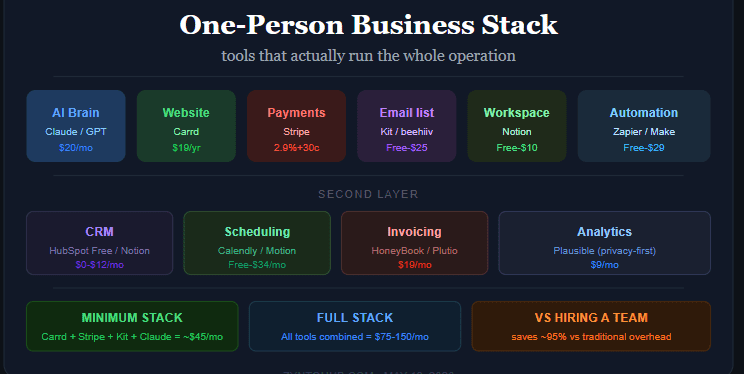
Quick Comparison: Full Stack at a Glance
| Category | Best Tool | Free Tier? | Paid From |
|---|---|---|---|
| AI assistant | Claude Pro or ChatGPT Plus | Yes | $20/mo |
| Website | Carrd | No | $19/yr |
| Payments | Stripe | No monthly fee | 2.9% + $0.30/txn |
| Email list | Kit (ConvertKit) | Yes (up to 10K subs) | $25/mo |
| Workspace / docs | Notion | Yes | $10/mo |
| Automation | Zapier or Make | Yes (limited) | $20-29/mo |
| CRM | HubSpot Free | Yes (fully featured) | Free |
| Scheduling | Calendly | Yes (1 event type) | $10/mo |
| Invoicing | HoneyBook or Plutio | No | $19/mo |
| Analytics | Plausible | No | $9/mo |
Minimum viable stack: Carrd + Stripe + Kit free + Claude Pro = ~$40-45/month. Full stack: All of the above = $75-150/month depending on tiers.
1. AI Assistant — Claude Pro or ChatGPT Plus
Best For: Writing, research, strategy, content repurposing, client communication drafts
Price: Free tier available | Paid: $20/month for both
Pros (Claude Pro):
- Best long-form writing quality — 128K token output in one pass
- Best for documents, analysis, and dense client deliverables
- Memory across conversations (free tier since March 2026)
Pros (ChatGPT Plus):
- Broadest feature set: image generation (DALL-E), web browsing, voice, code execution
- Better for one-tab-does-everything workflows
Cons:
- Neither integrates natively with your email or calendar — requires copy-paste
- You don’t need both; pick one and use it properly
Verdict: Start with Claude Free for documents and strategy. Add ChatGPT Plus ($20/mo) if you need images or voice. Most solopreneurs need one, not both.
2. Website — Carrd
Best For: Landing pages, portfolios, simple business sites
Price: $19/year (Pro Lite) | $49/year (Pro Standard — custom domain + forms)
Pros:
- Fastest setup of any website builder — under 30 minutes to live
- Clean, professional templates that don’t look cheap
- One-page design forces clarity (no bloated site architecture)
- $19/year is the lowest legitimate website cost available
Cons:
- Not for complex multi-page sites or e-commerce
- Limited SEO control compared to WordPress or Webflow
Verdict: The default for solopreneurs who need to look real fast without spending money or time. Upgrade to Webflow or WordPress when you need more — not before.
3. Payments — Stripe
Best For: Every solopreneur who needs to get paid online
Price: No monthly fee | 2.9% + $0.30 per transaction | Payouts next business day (or instant for 1.5% fee)
Pros:
- No monthly fees — you only pay when you earn
- Handles subscriptions, one-time payments, international currencies, and invoices
- Payment links created in 30 seconds, no technical setup required
- Industry standard: every SaaS tool integrates with Stripe natively
Cons:
- 2.9% + $0.30 adds up at high transaction volume — consider Paddle or Lemon Squeezy for digital products (they handle VAT/tax compliance)
- Chargebacks require manual handling
Verdict: Non-negotiable. Stripe is the payment infrastructure for one-person businesses in 2026. Start here; optimize later.
What Nobody Tells You About Passive Income: The Real Time and Upfront Cost
Best Freelance Websites to Find Remote Work in 2026
4. Email List — Kit (ConvertKit)
Best For: Creators, solopreneurs, and anyone building an audience as their primary distribution
Price: Free up to 10,000 subscribers | Paid from $25/month
Pros:
- Free tier is genuinely functional: landing pages, email broadcasts, basic automations
- Visual automation builder requires zero coding
- Built specifically for individual creators — not adapted from enterprise email tools
- beehiiv is the alternative if you want a newsletter-first experience with a referral program built in
Cons:
- Advanced segmentation and automations require paid plan
- beehiiv free tier (up to 2,500 subscribers) is more generous if you’re starting from zero
Verdict: Kit for established audiences or complex automations. beehiiv if you’re starting fresh and want a newsletter with built-in growth mechanics. Both beat Mailchimp for solopreneurs.
5. Workspace — Notion
Best For: Project management, client CRM, content calendar, personal wiki — all in one place
Price: Free (generous personal plan) | Plus: $10/month
Pros:
- Replaces 4–5 separate tools: task manager, CRM, content calendar, note-taking, knowledge base
- Notion AI (included in Plus) drafts emails, summarizes meeting notes, generates briefs from bullet points
- Free plan is enough for most solo operations
- Widely used — clients are often already familiar with it
Cons:
- Slower than dedicated tools in each category (not as fast as Linear for tasks, not as powerful as HubSpot for CRM)
- Can become cluttered if you don’t set up structure upfront
Verdict: The Swiss Army knife for solopreneurs. Set it up properly once; it replaces everything. Upgrade to Plus ($10/mo) when you start working with multiple clients simultaneously.
6. Automation — Zapier or Make
Best For: Connecting tools so you don’t manually move data between them
Zapier Price: Free (100 tasks/month) | Starter: $20/month (750 tasks) Make Price: Free (1,000 operations/month) | Core: $9/month
Pros (Zapier):
- 7,000+ integrations — if a tool exists, Zapier connects to it
- Beginner-friendly: template library, simple setup
- Better for straightforward “when X happens, do Y” automations
Pros (Make):
- More powerful branching logic and data manipulation
- Significantly cheaper per operation at scale
- Better for complex multi-step workflows
Cons:
- Free tiers are limited — you’ll hit the ceiling once you start automating seriously
- Make has a learning curve
Verdict: Start with Zapier free for basic automations. Move complex workflows to Make as your sophistication grows. Most solopreneurs end up using both.
7. CRM — HubSpot Free

Best For: Managing client contacts, deal pipeline, follow-up tracking
Price: Free (genuinely full-featured for solopreneurs) | Standard: $12/month
Pros:
- Contact management, deal pipeline, email logging, follow-up reminders — all free
- Built-in meeting scheduler (replaces Calendly for basic use)
- Scales to 10–20 active client relationships without any paid features
- Email templates save hours of manual follow-up
Cons:
- Upgrade costs jump sharply once you need marketing automation
- More complex than most solopreneurs need — Notion CRM setup works for simpler operations
Verdict: Use HubSpot Free if you actively manage a sales pipeline with 5+ prospects at once. Use a simple Notion database if your client work is more referral-based and informal.
8. Scheduling — Calendly
Best For: Eliminating back-and-forth booking emails with clients
Price: Free (1 event type) | Standard: $10/month | Teams: $16/month
Pros:
- Share one link, client books directly into your available slots
- Eliminates 1–2 hours/week of scheduling friction
- Standard plan adds multiple event types, workflows, and automated reminder emails
Cons:
- Motion ($19/month) is more intelligent — it builds your daily schedule automatically around meetings and rescheduled tasks
- Some clients find scheduling links impersonal at the start of a relationship
Verdict: Calendly free for getting started. Motion ($19/month, annual $14/month) if calendar management is a real bottleneck — solopreneurs who switch report reclaiming 2–3 hours per day.
9. Invoicing & Client Management — HoneyBook or Plutio

Best For: Proposals, contracts, invoices, and client onboarding in one flow
HoneyBook Price: Starter: $19/month | Essentials: $39/month Plutio Price: Core: $19/month (up to 9 active clients)
Pros:
- Both handle the full client lifecycle: proposal → contract → payment → project
- AI generates proposals from a brief and suggests pricing from your project history
- HoneyBook AI specifically: personalizes proposals automatically
- Plutio is an all-in-one: CRM + scheduling + proposals + invoicing + project management at $19/month
Cons:
- Overkill if you have fewer than 5 clients — Stripe + a simple Notion doc works fine
- HoneyBook’s higher tiers get expensive fast
Verdict: Plutio at $19/month is the best value for solopreneurs with 5–20 active clients. HoneyBook if you’re in a service business (photography, events, consulting) where the client journey is proposal-heavy.
10. Analytics — Plausible
Best For: Website traffic data without the complexity (or privacy issues) of Google Analytics
Price: $9/month
Pros:
- Privacy-first: GDPR-compliant with no cookie banners required
- Shows the metrics that matter (traffic, sources, top pages) without the noise
- Lightweight script that doesn’t slow your site
- Simple enough to actually check weekly
Cons:
- No event tracking depth of Google Analytics
- $9/month vs free Google Analytics is a real trade-off for bootstrapped budgets
Verdict: Worth the $9/month if you care about data and want to stay GDPR-clean without a compliance headache. Use Google Analytics (free) if budget is tight and you’re comfortable with the complexity.
Recommended Stacks by Stage
Just starting ($0–$45/month): Carrd $19/year + Stripe (free) + Kit free tier + Claude Free + Notion free + HubSpot free + Calendly free → Total fixed cost: ~$20/year + Stripe transaction fees
Growing ($75–$100/month): Add Claude Pro $20 + Kit paid $25 + Zapier Starter $20 + Plausible $9 → Covers writing, email growth, automation, and analytics properly
Optimized ($100–$150/month): Add HoneyBook or Plutio $19 + Motion $19 + Notion Plus $10 → Full professional operation: client management, smart scheduling, connected workspace
FAQ
Q: What is the minimum cost to run a one-person online business in 2026? About $20/year (Carrd Pro Lite) plus Stripe transaction fees. Add Claude Free, Kit free, Notion free, and HubSpot free — and your fixed monthly cost is essentially zero until you’re earning enough to justify paid tiers.
Q: Do I need all of these tools? No. Most solopreneurs under $5,000/month should stay on free tiers. The right order: get clients first, then optimize the stack. Don’t spend money on tools before you have revenue to justify it.
Q: Is Notion enough as a CRM? For most solopreneurs managing under 10 clients, yes. A simple Notion database with contact info, status, and next action is more than enough. Add HubSpot when you have a proper sales pipeline with 10+ active prospects.
Q: Should I use Zapier or Make? Zapier for beginners — faster setup, more integrations, better templates. Make for complex workflows — cheaper per operation, more powerful logic. Most serious solopreneurs use both.
Q: What’s the fastest way to look legitimate online? Carrd Pro ($19/year) for a clean one-page site + a custom domain (~$12/year) + a professional email via Google Workspace ($6/month). Total: under $50 for the first year.
Q: Do I need both Claude and ChatGPT? No. Pick one and learn it properly. Claude Pro for writing, documents, and analysis. ChatGPT Plus if you also need image generation and voice. Most solopreneurs get 90% of their AI value from one subscription.